
Landolt C Chart1.0 - Google Play
You'll be able to see results in few seconds.
Publisher Description
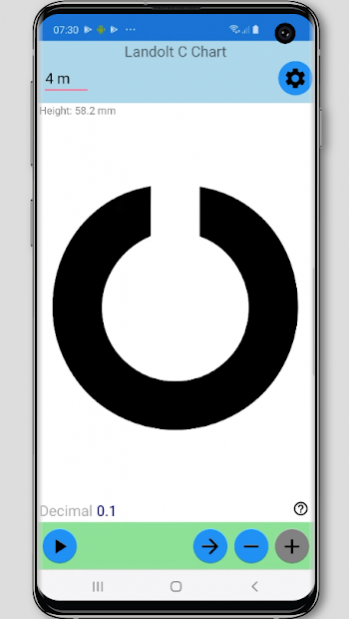


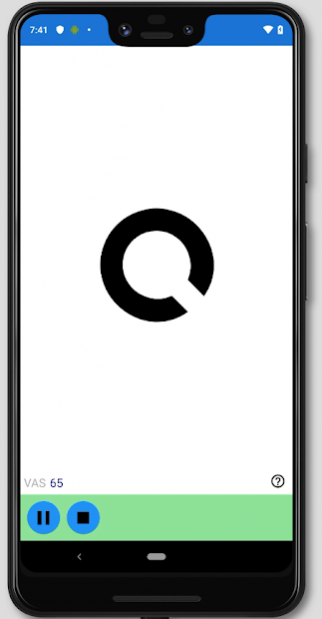
Prevention is better than cure. Designed for children older than 6, parents with young children, and general practitioners, this app displays optically precise optotypes of Landolt C chart for you to measure distant visual acuity accurately in order to detect nearsightedness or myopia and early, so you can take preventive measures and seek help from medical professional early to prevent pseudomyopia from becoming myopia, or prevent nearsightedness from getting worse.
Predefined Test Distances:
* 6, 5, 4, 3, and 2 meters
* 20, 15, 12, 10, 6 feet
At exactly 6 meters away from the “patient”, the optotypes on the 6/6 line (Decimal 1.0 or LogMar 0.0) shall subtend 5 minutes of arc, which means that the chart should be sized such that these optotypes are 8.73mm tall, and the topmost (Snellen Fraction 6/60, Decimal 0.1, or LogMar 1.0) optotypes should be 87.3 mm tall. At exactly 20 feet away from the “patient”, the topmost optotypes should be 88.7 mm tall, because 20 feet equals 6.096 meters.
Scenarios:
1. "Doctor" and "Patient".
2. Self-diagnosis with a mirror.
3. Self-diagnosis with a Bluetooth keyboard.
4. Self-diagnosis within arm's reach.
Notations:
1. Decimal (0.50)
2. Fraction (20/40)
3. LogMAR (0.30)
4. Fraction (5/10)
5. Fraction (6/12)
6. MAR (2)
7. VAS or VAR (85)
Test Modes:
1. Autoplay
2. Manual
In Autoplay, the app calculates the score. For LogMAR notation, the score is (LogMAR value of the best line read) + 0.02 x (number of optotypes missed). And the maximum missed is 3. For VAS notation, the score is an inversion of the logMAR scale, based on VAS=100-50xlogMAR. For other notations, the score is the notation value of the best line read and optionally minus number of optotypes missed, and the maximum missed is 2.
By default, setting "Play Interval Until Next Optotype" is none. Available intervals in second: 2, 4, 6, 8, and 10. If the "patient" could not recognize the optotype within the interval, this counts a miss.
Through enabling “Record Scores” in Settings, you can keep track of the progression of your visual acuity. Visual acuity scores of multiple testees could be recorded. Visual Acuity Score (VAS) is an inversion of the logMAR scale, based on VAS=100-50xlogMAR. It is more intuitive since higher values indicate better visual acuity.
In the scores review, score 100 in blue indicates the reference standard, scores above 100 in green indicates no myopia, while scores below 100 in red may indicate myopia.
Testing for myopia takes several procedures and the first step is often to check distant visual acuity through a visual acuity chart. And the decrement of visual acuity may indicate the development of myopia.
Disclaimer:
While this app may replace Landolt C Chart in print, however it cannot replace doctors and optometrists who carry out comprehensive tests for your eyes. Please visit optometrists regularly and seek help from medical professional at early signs of visual acuity problems.
About Landolt C Chart
The company that develops Landolt C Chart is Fonlow. The latest version released by its developer is 1.0.
To install Landolt C Chart on your Android device, just click the green Continue To App button above to start the installation process. The app is listed on our website since 2019-10-15 and was downloaded 0 times. We have already checked if the download link is safe, however for your own protection we recommend that you scan the downloaded app with your antivirus. Your antivirus may detect the Landolt C Chart as malware as malware if the download link to com.fonlow.c is broken.
How to install Landolt C Chart on your Android device:
- Click on the Continue To App button on our website. This will redirect you to Google Play.
- Once the Landolt C Chart is shown in the Google Play listing of your Android device, you can start its download and installation. Tap on the Install button located below the search bar and to the right of the app icon.
- A pop-up window with the permissions required by Landolt C Chart will be shown. Click on Accept to continue the process.
- Landolt C Chart will be downloaded onto your device, displaying a progress. Once the download completes, the installation will start and you'll get a notification after the installation is finished.
Program Details
System requirements
Download information
Pricing
Version History
version 1.0
posted on 2019-10-15
Initial release.
Disclaimer
Official Google Play Link
We do not host Landolt C Chart on our servers. We did not scan it for viruses, adware, spyware or other type of malware. This app is hosted by Google and passed their terms and conditions to be listed there. We recommend caution when installing it.
The Google Play link for Landolt C Chart is provided to you by apps112.com without any warranties, representations or guarantees of any kind, so access it at your own risk.
If you have questions regarding this particular app contact the publisher directly. For questions about the functionalities of apps112.com contact us.
